Archiving Data in the File Cabinet
Need to get older data out of the way so you can focus on your current work in Neat? While Neat does not currently include a built-in archive feature, you can create your own Archive folder to keep your workspace organized without deleting any data.Because folders in Neat are sorted alphabetically (with numbers and symbols appearing before letters), you can name your archive folder so it appears near the bottom of your folder list, keeping it easily accessible but out of the way.
To create an Archive folder:
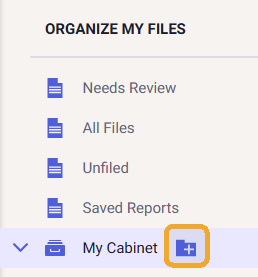
- Go to My Cabinet and click the +folder icon to the right of it to create a new folder.
- In the Create New Folder window, make sure the Location is set to My Cabinet.
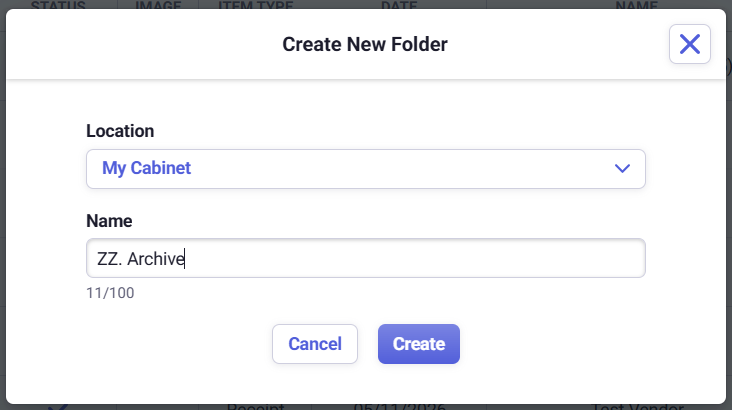
- Name the folder something like ZZ. Archive. Using "ZZ" helps place the folder near the bottom of your folder list, just above Trash (unless you have other folders that also begin with "ZZ").
- Click Create.
- Drag and drop entire folders into the ZZ. Archive folder.
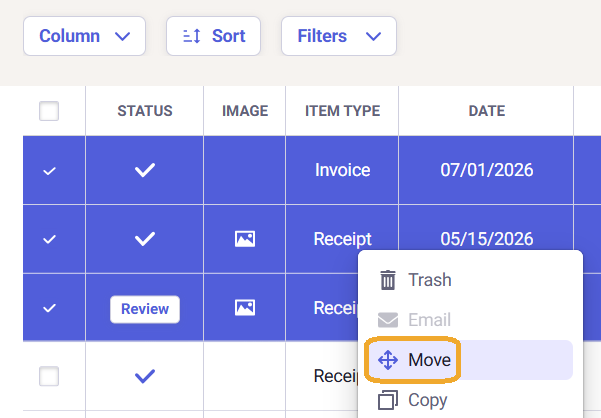
- To move individual files, select one or more items, right-click, choose Move, and select ZZ. Archive as the destination.
Neat Pro Tip: If you have any suggestions or ideas for a possible archive feature in Neat please submit them via our Feedback Form.
